MDX render failed
# Toad
A unified interface for AI in your terminal ([release announcement](https://willmcgugan.github.io/toad-released/)).
<table>
<tbody>
<tr>
<td><img alt="Screenshot 2026-01-30 at 19 23 54" src="https://github.com/user-attachments/assets/aca51988-359a-466d-bdd1-050dc3d678ac" /></td>
<td><img alt="Screenshot 2026-01-30 at 19 21 00" src="https://github.com/user-attachments/assets/b9b0a6bb-e084-4976-86c2-cccdb42041ae" /></td>
</tr>
<tr>
<td><img alt="Screenshot 2026-01-30 at 19 29 47" src="https://github.com/user-attachments/assets/3fe4060f-d468-4635-b80f-03c24625c6c0" /></td>
<td><img alt="Screenshot 2026-01-30 at 19 30 08" src="https://github.com/user-attachments/assets/03659d64-02fc-4936-a90d-e202bc4b70a1" /></td>
</tr>
</tbody>
</table>
## Quickstart
Install:
```
curl -fsSL batrachian.ai/install | sh
```
Run:
```
toad
```
See [Getting Started](#getting-started) if you have any problems.
## What is Toad?
Toad is an interface to coding agents, such as Claude, Gemini, Codex, OpenHand, and many more.
Toad blends a traditional shell based workflow and powerful agentic AI, with an intuitive Terminal User Interface.
<table>
<tbody>
<tr>
<td>
<h3>AI "App store"</h3>
<p>
Find, install, and run dozens of agents directly from the Toad UI.
<p>
There is a large and growing list of AI agents that work with Toad.
Discover agents from big tech and smaller Open Source projects.
<p>
Developers can add support for their own agents, via the <a href="https://agentclientprotocol.com/overview/introduction">Agent Client Protocol</a>.
</td>
<td>
<img alt="Screenshot 2026-01-27 at 12 48 30" src="https://github.com/user-attachments/assets/f7bd3776-6405-47e5-9d1f-11a12a4ce3b2" />
</td>
</tr>
<tr>
<td>
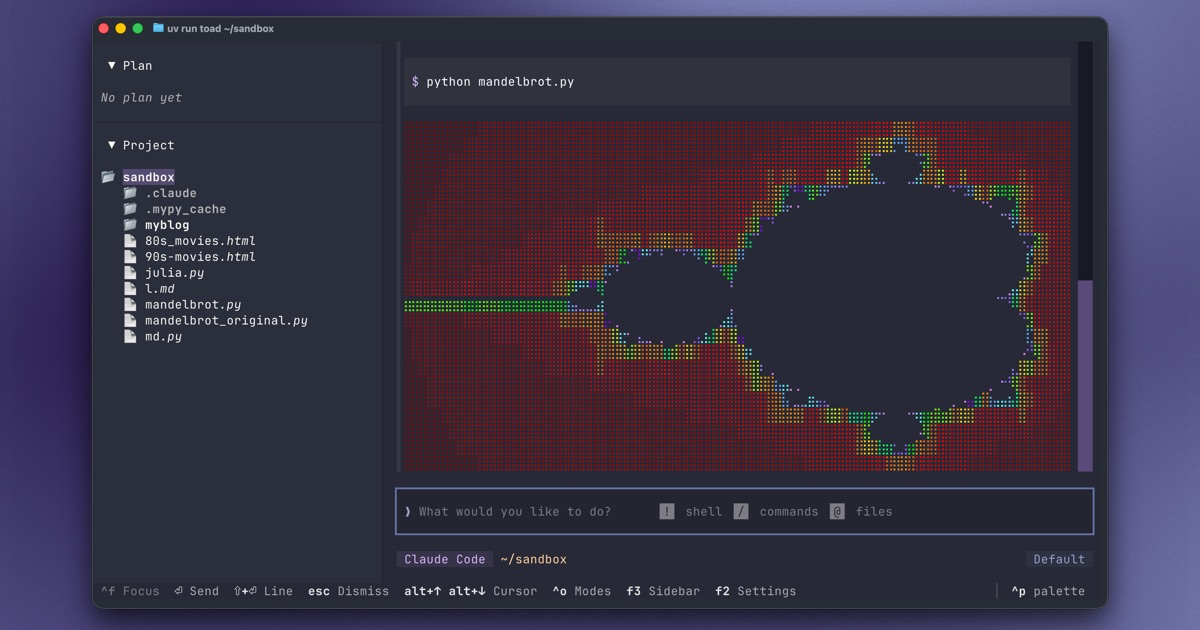
<h3>Toad Shell</h3>
<p>
While most terminal agent interfaces can run commands (with the <kbd>!</kbd> syntax), they aren't running a shell.
If you change directory or set environment variables, they won't persist from one command to the next.
<p>
Output that contains more than simple text will typically be garbled, and anything interactive will fail or even break the TUI entirely.
<p>
Toad integrates a fully working shell with full-color output, interactive commands, and tab completion.
Allowing you to interleave prompts for the agent with terminal workflows.
<p>
At time of writing Toad is the only terminal UI which does this.
</td>
<td><img src="https://github.com/user-attachments/assets/ac9247bb-3daa-4bb7-b3fd-e0bbd22475fa"/></td>
</tr>
<tr>
<td>
<h3>Prompt Editor</h3>
<p>
Toad has a nice Markdown prompt editor, with syntax highlighting for code fences.
Full mouse support, cut and paste, many keybindings and shortcuts.
</td>
<td>
<img src="https://github.com/user-attachments/assets/3d619b94-ec53-4e7a-b905-5aef6f4fa8a6"/>
</td>
</tr>
<tr>
<td>
<h3>File Picker</h3>
<p>
Add a file to your prompt with <kbd>@</kbd>, and toad will show a fuzzy file picker.
<p>
Type a few characters from the filename or folder and Toad will refine the search as you type.
Hit <kbd>enter</kbd> to add the file to the prompt.
<p>
The fuzzy picker is great when you know the file you want to mention.
If you want to explore your files, you can press <kbd>tab</kbd> to switch to an interactive tree control.
</td>
<td>
<img src="https://github.com/user-attachments/assets/ab25c389-1d2f-4006-a1d8-159edbd3ed00"/>
</td>
</tr>
<tr>
<td>
<h3>Beautiful Diffs</h3>
<p>
Side-by-side or unified diffs, with syntax highlighting for most languages.
</td>
<td>
<img alt="Screenshot 2026-01-27 at 12 44 22" src="https://github.com/user-attachments/assets/b3d6c29c-d6ec-4253-a9dc-2df0ff21e293" />
</td>
</tr>
<tr>
<td>
<h3>Elegant Markdown</h3>
<p>
Markdown is the language of LLMs (AI).
Toad's streaming Markdown support can display syntax highlighted code fences, elegant tables, quotes, lists, and more.
</td>
<td>
<img src="https://github.com/user-attachments/assets/b650b407-f4ab-4cb9-8920-55c15073598e"/>
</td>
</tr>
<tr>
<td>
<h3>Simple Settings</h3>
<p>
An intuitive settings system (no need to manually edit JSON files).
<p>
Tune Toad to your liking.
Almost everything in Toad may be tweaked.
If you want to create an ultra-minimal UI with nothing more than a prompt—you can!
</td>
<td>
<img src="https://github.com/user-attachments/assets/2ff0de12-c2e1-455b-954a-21e66c070dd8"/>
</td>
</tr>
<tr>
<td>
<h3>Concurrent sessions</h3>
<p>
Launch and run multiple agents from potentially different providers.
<p>
Hit <kbd>ctrl+s</kbd> to show the current state of all your agents in one screen.
</p>
</td>
<td>
<img alt="Screenshot 2026-02-16 at 17 33 40-fs8" src="https://github.com/user-attachments/assets/cd3128eb-b348-4f40-b5c0-4816d07dcbe9" />
</td>
</tr>
<tr>
<td>
<h3>Session Resume</h3>
<p>
Resume previous sessions with your agent.
<p>
Hit <kbd>ctrl+r</kbd> to pick a previous session to resume.
</td>
<td>
<img alt="Screenshot 2026-02-01 at 16 57 46" src="https://github.com/user-attachments/assets/7c1ad59e-027c-4542-a216-9a32ef573936" />
</td>
</tr>
</tbody>
</table>
## Video
Watch a preview of the Toad User Interface:
https://github.com/user-attachments/assets/ced36f4b-db02-4d29-8a0a-14ec64b22881
## Compatibility
Toad runs on Linux and macOS. Native Windows support is currently lacking (but on the roadmap), but Toad will run quite well with WSL.
Toad is a terminal application.
Any terminal will work, although if you are using the default terminal on macOS you will get a much reduced experience.
I recommend [Ghostty](https://ghostty.org/) which is fully featured and has amazing performance.
### Clipboard
On Linux, you may need to install `xclip` to enable clipboard support.
```
sudo apt install xclip
```
## Getting Started
The easiest way to install Toad is by pasting the following in to your terminal:
```bash
curl -fsSL batrachian.ai/install | sh
```
You should now have `toad` installed.
If that doesn't work for any reason, then you can install with the following steps:
First [install UV](https://docs.astral.sh/uv/getting-started/installation/):
```bash
curl -LsSf https://astral.sh/uv/install.sh | sh
```
Then use UV to install toad:
```bash
uv tool install -U batrachian-toad --python 3.14
```
Toad is also available on [conda-forge](https://conda-forge.org), and can be installed using [pixi](https://pixi.prefix.dev/latest/#installation):
```bash
pixi global install batrachian-toad
```
## Using Toad
Launch Toad with the following:
```bash
toad
```
You should see something like this:
<img alt="front-fs8" src="https://github.com/user-attachments/assets/8831f7de-5349-4b3f-9de9-d4565b513108" />
From this screen you will be able to find, install, and launch a coding agent.
If you already have an agent installed, you can skip the install step.
To launch an agent, select it and press <kbd>space</kbd>.
The footer will always display the most significant keys for the current context.
To see all the keys, press <kbd>F1</kbd> to display the help panel.
### Toad CLI
When running Toad, the current working directory is assumed to be your project directory.
To use another project directory, add the path to the command.
For example:
```bash
toad ~/projects/my-awesome-app
```
If you want to skip the initial agent screen, add the `-a` switch with the name of your chosen agent.
For example:
```bash
toad -a open-hands
```
To see all subcommands and switches, add the `--help` switch:
```bash
toad --help
```
### Web server
You can run Toad as a web application.
Run the following, and click the link in the terminal:
```bash
toad serve
```

## Toad development
Toad was built by [Will McGugan](https://github.com/willmcgugan) and is currently under active development.
To discuss Toad, see the Discussions tab, or join the #toad channel on the [Textualize discord server](https://discord.gg/Enf6Z3qhVr).
### Roadmap
Some planned features:
- UI for MCP servers
- Expose model selection (waiting on ACP update)
- Sessions (resume)
- Multiple agents
- Windows native support
- Builtin editor
- Sidebar (widgets)
- Git pending changes
### Reporting bugs
This project is trialling a non-traditional approach to issues.
Before an issue is created, there must be a post in Discussions, approved by a Toad dev (Currently @willmcgugan).
By allowing the discussions to happen in the Discussion tabs, issues can be reserved for actionable tasks with a clear description and goal.
## Licensing
Toad is licensed under the [AGPL](./LICENSE) license. Commercial licenses are available. See [COMMERCIAL_LICENSE.md](./COMMERCIAL_LICENSE.md).